-
자바스크립트 3. 배열SYNC 기술면접 준비 2023. 11. 5. 17:58
<참고영상> https://www.youtube.com/watch?v=aBJzzhQ6y-o
<배열>
[대괄호]로 시작해서 [대괄호]로 끝난다.
<!DOCTYPE html>
<html lang="en">
<head>
    <meta charset="UTF-8">
    <meta name="viewport" content="width=device-width, initial-scale=1.0">
    <title>Document</title>
</head>
<body>
    <h1>Array</h1>
    <h2>Syntax</h2>
    <script>
    var coworkers = ["egoing", "leezche"];
    </script>
    <h3>Get</h3>
    <script>
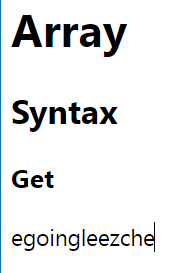
        document.write(coworkers[0]);
    </script>
</body>
</html>
var coworkers = ["egoing", "leezche"]; > 배열 [0] [1]document.write( coworkers [0]); > coworkers 변수에 [0]번째 인덱스를 가져와라.
document.write(coworkers[0]);
document.write(coworkers[1]);
 document.write(coworkers.length) > 값이 2개이기때문에값은 '2'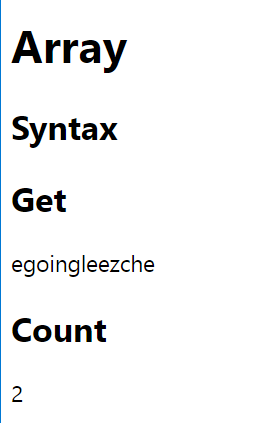
document.write(변수명[인덱스 번호]); > 배열 값을 가져오는 방법
document.write(변수명.length); > 값이 몇개 들어있는가
변수명.push('추가내용'); > 배열에 값을 추가하고자 한다면(끝 쪽에 추가가 된다.)
    <h1>Array</h1>
    <h2>Syntax</h2>
    <script>
    var coworkers = ["egoing", "leezche"];
    </script>
    <h2>Get</h2>
    <script>
        document.write(coworkers[0]);
        document.write(coworkers[1]);
    </script>
    <h2>Count</h2>
    <script>
        document.write(coworkers.length)
    </script>
    <h2>Add</h2>
    <script>
        coworkers.push('duru');
        coworkers.push('taeho');
    </script>

    <h2>Count</h2>
    <script>
        document.write(coworkers.length)
    </script>
< 추가 >
var : 중복선언 가능, 마지막에 할당된 값이 변수에 저장된다.
let, const : 중복선언 불가, 이미 선언한 변수를 다시 선언할 경우, 에러가 발생한다.
var, let : 변수를 선언하는 키워드, 변수 선언 및 초기화 이후에 반복해서 다른 값을 재할당 가능하다.
const : 상수를 선언하는 키워드, 처음 선언 및 초기화하고 나면 다른 값을 재할당 할 수 없다
< 정리 >
var(선언) coworkers(변수명) = ['값1', '값2']
document.write() > 자바스크립트 출력 명령문(내용)
변수명.push('값3'); > 값 추가
document.write(변수명.length); > 값의 갯수
'SYNC 기술면접 준비' 카테고리의 다른 글
자바스크립트 6. 연산 (0) 2023.11.07 자바스크립트 5. 함수 (0) 2023.11.07 자바스크립트 4. 객체 (0) 2023.11.06 자바스크립트 2. 데이터 타입 (0) 2023.11.05 자바스크립트 1. 변수 (0) 2023.11.03